 By Saurav Mehra
 Buying a new smartphone in India has become a serious decision. You compare camera quality, battery life, processor, display, storage, 5G bands and fast charging. Then you see one more attractive feature on the box or website: IP68 rating. It sounds powerful. Many buyers immediately think, “Great, this phone is waterproof. Now rain, swimming pool or accidental water splash will not be a problem.”
But this is where confusion begins. IP68 does not mean your phone is fully waterproof in every situation. It means the phone has been tested for a certain level of dust and water resistance under controlled conditions. Real life is very different from a laboratory test. Indian users expose phones to rain, bathroom steam, sweat, beach water, swimming pools, Holi colours, dusty roads, construction areas, bike rides, kitchen spills and humid weather. These situations are not always covered by the simple word “water-resistant.”
So, before you confidently take your phone into water or wash it under a tap, it is important to understand what IP68 really means, what it protects against, what it does not protect against, and why brands still refuse warranty for liquid damage in many cases.
What Does IP Rating Mean?
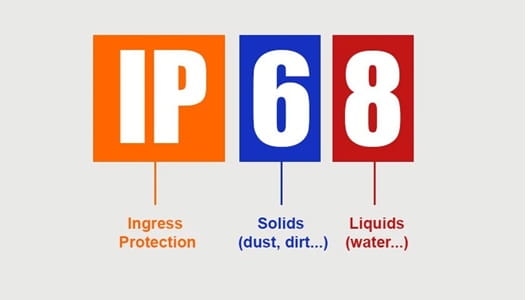
IP stands for Ingress Protection. In simple words, it tells how well a device is protected against the entry of solid particles like dust and liquids like water.
An IP rating usually has two numbers. The first number shows protection from dust and solid particles. The second number shows protection from water.
For example, in IP68, the number 6 is for dust protection and the number 8 is for water protection. This rating is commonly seen in premium smartphones, some mid-range phones, smartwatches and earbuds.
The rating gives buyers a useful idea of durability, but it should not be treated as unlimited protection.
What Does the “6” in IP68 Mean?
The first digit in IP68 is 6. This is the highest dust-protection level in the IP rating system for solid particles. It means the device is designed to be dust-tight under test conditions.
For Indian users, this is useful because dust is everywhere—roads, construction sites, bike rides, metro work, office bags, pockets, markets and travel. A dust-resistant phone is less likely to allow fine dust inside the body, ports and internal areas.
But this does not mean you should intentionally expose your phone to sand, cement dust or rough construction debris. Fine particles can still damage speakers, charging ports, buttons and camera areas externally. Dust resistance helps, but careful handling is still important.
What Does the “8” in IP68 Mean?
The second digit in IP68 is 8. It means the phone can handle immersion in water beyond the basic IPX7 level, under conditions specified by the manufacturer.
This is the tricky part. IP68 does not mean the same depth and time for every phone. One brand may test a phone at 1.5 metres for 30 minutes. Another may specify a different depth or time. You must check the exact claim for your phone model.
Most smartphone brands mention water resistance in fresh water under controlled conditions. That does not automatically include sea water, swimming pool water, hot water, soapy water, pressure jets or long underwater use.
Is an IP68 Phone Waterproof?
No, an IP68 phone should be called water-resistant, not fully waterproof. Waterproof sounds like the phone can survive any water situation, but that is not true.
An IP68 phone may survive accidental splashes, rain or brief freshwater immersion, depending on the model. But it is not designed for careless underwater photography, shower use, sea swimming, water parks, soap exposure or repeated soaking.
The word “waterproof” creates overconfidence. A safer way to think is: IP68 gives protection against accidents, not permission for experiments.
Why Brands Still Do Not Cover Liquid Damage
Many users feel cheated when a water-resistant phone gets damaged and the service centre says liquid damage is not covered. But brands usually mention this clearly in their terms.
Water resistance can reduce over time. Drops, dents, repairs, heat, pressure, ageing, loose seals, cracked back panels, damaged buttons or opened devices can weaken protection. A phone may be IP68 when new, but after one year of daily use, its resistance may not be the same.
Service centres cannot always know exactly how the phone was exposed to water. Was it rainwater, pool water, salt water, hot water, or pressure washing? Was the phone already damaged? Because of this, liquid damage is often excluded from standard warranty.
Fresh Water vs Salt Water vs Pool Water
IP68 tests usually focus on fresh water. Real life often involves other liquids.
Salt water is highly risky. If your phone falls into sea water at Goa, Mumbai, Chennai or Andaman, salt can corrode internal parts quickly. Even if the phone works at first, damage may appear later.
Swimming pool water contains chlorine and other chemicals. These can affect seals and metal parts. Soap water, shampoo, detergent, sanitiser, soft drinks, tea, coffee and juice are also more damaging than plain water.
If your phone comes in contact with anything other than fresh water, wipe it immediately and avoid charging until fully dry.
Rain Protection: Is IP68 Useful?
Yes, IP68 is useful during rain. If you are caught in sudden monsoon rain, taking a call, using maps or receiving a splash is usually less risky on an IP68 phone than on a non-rated phone.
But do not use rain resistance as an excuse for careless handling. Heavy rain, water pressure, wet pockets, bike riding in rain and long exposure can still be risky.
After rain exposure, dry the phone properly. Wipe the body, remove the case, clean around buttons and ports gently, and let it dry before charging.
Can You Take Underwater Photos With an IP68 Phone?
Many people want to use IP68 phones for underwater reels, pool selfies or vacation videos. This is risky.
Touchscreens often do not work properly underwater. Water pressure increases with depth. Pool chemicals and salt water can damage seals. If the phone slips, hits a hard surface or stays underwater too long, damage can happen.
If you need underwater photography, use a proper waterproof case or action camera designed for that purpose. Your expensive smartphone should not be treated like a swimming camera just because it has IP68.
Bathroom and Shower Use Is Risky
Using the phone in the bathroom is common—music while bathing, calls, reels, or scrolling. But steam and hot water are different from normal water immersion tests.
Steam can enter tiny openings more easily than liquid water in some situations. Soap, shampoo and hot water can weaken seals and damage coatings. Sudden temperature changes can also create condensation.
Avoid taking your phone into the shower area. If you need music, keep it outside the wet zone or use a waterproof Bluetooth speaker.
Charging Port Safety After Water Exposure
Never charge a wet phone. This is one of the most important rules.
Even if the phone looks dry outside, moisture may remain inside the charging port. Charging in that condition can cause corrosion, short circuits or charging errors. Many phones show a moisture warning and stop charging automatically, but do not depend only on warnings.
If your phone gets wet, wipe it with a dry cloth, gently tap it with the port facing down and let it air dry. Do not insert sharp objects, tissue pieces or cotton deeply into the port. Do not use a hair dryer or heater.
Wait until the charging port is completely dry before plugging in the charger.
Does IP68 Protect Against Dusty Indian Roads?
IP68 helps against dust entry, but it does not make the phone immune to rough use. Fine dust can still collect in speaker grills, microphone holes, SIM tray edges and charging ports.
If you travel daily by bike, work near construction or live in a dusty area, use a good case and clean the phone gently. Avoid blowing hard into ports because moisture from breath can enter. Use a soft dry brush for external dust if needed.
Dust protection is helpful, but external cleaning still matters.
What Happens After Phone Repair?
If your phone has been opened for screen replacement, battery replacement, back panel repair or camera repair, water resistance may reduce. Good service centres may replace seals properly, but original factory-level sealing is difficult to guarantee after repair.
If your phone was repaired at a local shop, do not assume IP68 protection remains the same. Even a small sealing gap can allow water entry.
After repair, treat the phone as less water-resistant unless the service centre clearly confirms proper sealing and testing.
IP68 vs IP67 vs IP54
IP68 is stronger than IP67 in water immersion protection, but the exact difference depends on manufacturer conditions. IP67 generally indicates dust-tight protection and immersion up to a limited depth and time. IP68 usually allows deeper or longer immersion than IP67, as defined by the brand.
IP54 is different. It usually means limited dust protection and splash protection, not full dust-tight or immersion protection. A phone with IP54 can handle light splashes better than a non-rated phone, but it should not be dipped in water.
When buying a phone, do not only look at “IP rating available.” Check the exact rating.
What About IP69?
Some newer phones advertise IP69 along with IP68. IP69 generally indicates stronger protection against high-pressure, high-temperature water jets under specific test conditions. This may sound impressive, but even IP69 does not mean unlimited waterproofing.
For normal smartphone users, IP68 is already useful for accidental protection. IP69 may add extra durability in rough conditions, but warranty limitations and real-life caution still apply.
Do not assume IP69 means you can wash the phone daily or use it in hot showers.
How to Check Your Phone’s IP Rating
Do not guess based on price. Some expensive phones may have strong ratings, while some mid-range phones may offer only basic splash resistance. Some budget phones may have no official IP rating.
Check the brand’s official product page, user manual or specifications. Look for exact terms like IP68, IP67, IP54 or splash resistance. If a brand only says “water-repellent coating” or “splash-proof,” it may not be the same as IP68.
Also remember that cases, screen guards and back covers may not carry the same rating. Your phone may be water-resistant, but your charger, cable, earbuds case or accessories may not be.
What to Do If Your IP68 Phone Falls in Water
Remove it immediately. Switch it off if it is acting strangely. Remove the case. Wipe it with a clean dry cloth. Keep the charging port facing down and gently tap to remove water. Let it dry in a ventilated area.
Do not charge it immediately. Do not use a hair dryer, heater, microwave, direct sunlight or compressed air. Avoid shaking aggressively. Do not put it in rice as a serious repair method; rice dust can enter ports and may not solve internal moisture.
If the phone fell in salt water, pool water, tea, coffee or any sticky liquid, get it checked at a service centre.
Practical Care Tips for IP68 Phones
Use IP68 as backup protection, not daily permission. Avoid underwater use. Keep the phone away from soap, shampoo, sea water and pool water. Dry it properly after rain. Do not charge when wet. Use a case to protect against drops because physical damage can reduce sealing.
After any major drop, crack or repair, be extra careful around water. If your phone is old, do not trust water resistance like it is brand new.
Is IP68 Worth Paying Extra For?
Yes, IP68 can be worth it, especially for people who travel, commute in rain, work outdoors, live in dusty areas, use phones during monsoon or want better accidental protection.
But do not buy IP68 only for underwater use. Buy it for peace of mind against accidents. It is a durability feature, not a water-sports feature.
For Indian users, IP68 is useful because phones face dust, sweat, rain and accidental spills often. Just remember its limits.
FAQs
Q1. Does IP68 mean my phone is fully waterproof?
No. IP68 means the phone is dust-tight and water-resistant under specific test conditions. It does not mean the phone is fully waterproof in all real-life situations.
Q2. Can I swim with an IP68 phone?
It is not recommended. Pool water contains chemicals, sea water contains salt, and underwater pressure can damage the phone. Use a proper waterproof case or action camera for swimming.
Q3. Will warranty cover water damage on an IP68 phone?
Usually, liquid damage is not covered under standard warranty, even if the phone has an IP68 rating. Water resistance can reduce over time due to wear, drops or repairs.
Q4. What should I do if my phone gets wet?
Remove it from water quickly, wipe it dry, remove the case and let it air dry. Do not charge it until the port is fully dry. If it fell in salt water, pool water or any sticky liquid, visit a service centre.